- Get link
- X
- Other Apps
Posts
Best Navigation Drawer Libraries for Android Project

A lot of android applications like Google +, Facebook, Gmail, YouTube already introduced sliding menu /navigation drawer in their application . And most of them used navigation drawer in left side of app but some application have used in right and other also. Here I have collected some Android Navigation Drawer Libraries. There are a lot of third party android navigation drawer library available in the internet and I have mentioned some useful and most popular libraries here. You can choose any of them for your project. Android Navigation Drawer Libraries Following are the best navigation drawer libraries for android. Material Drawer by Milk Penz This is flexible , easy to use, all in one drawer library for your android project. This library has a header with profile, a mini drawer for tablets, provides custom drawer items custom colors, customs themes, etc. Get Material Drawer From GitHub Navigation Drawer-Material Design by Rudson Lima This library als...
How to Implement Ripple Effect in Android

In this tip, I’m going to show you to implement ripple effect/animation in your android application. Now, you can easily add ripple effect/animation in your android, layouts, buttons, textviews, etc. and you can also change its color. Note that, this ripple effect will only show on device running lollipop and above. Here, I have mentioned two different methods to implement ripple animation in your android application. Method 1 - To Implement Ripple Effect/Animation in Android To implement effect on press/click just add android:background="?attr/selectableItemBackground" or android:background="?attr/selectableItemBackgroundBorderless" in android View or ViewGroup as background. Method 2: To Implement Ripple Effect/Animation in Android Using this method, you can customize ripple effect color. First, you have to create an xml file in your drawable resource directory. Create a ripple_effect.xml file and add following code....
How to Make Scrollable TextView in Android
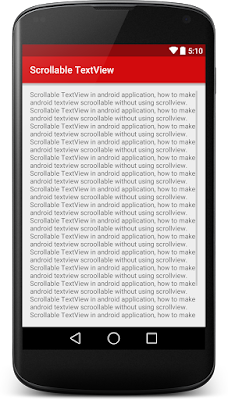
Android TextView allows user to display text in android application. In this tips, I will show how to make scrollable TextView in android. To make TextView scrollable, you don’t need to use ScrollView, just add android:scrollbars=”vertical” attribute in TextView and then add two line of code in your java activity file. XML Layout File Following is the xml layout file which contain a LinearLayout and a TextView. res/layout/scrollable_textview.xml Java Activity File Following is the final code of MainActivity.java file. src/MainActivity.java Now, run your application and see texts are scrolling. Output: